Visual automations
An automation is a sequence that can take different turns. You draw a path of steps: send an email, wait, then if the person did something, go one way, otherwise the other. It needs Postalion Pro 1.2, Postalion 1.8 or newer, and an active licence.
Sequence or automation?
Both start the same way and send the same kind of email. A sequence is a straight line of emails, the quickest to set up. An automation adds branches and actions: check whether someone opened, clicked or bought, tag them, move them to another list, tell you, or tell another app. Use whichever fits; they can run side by side.
Making one
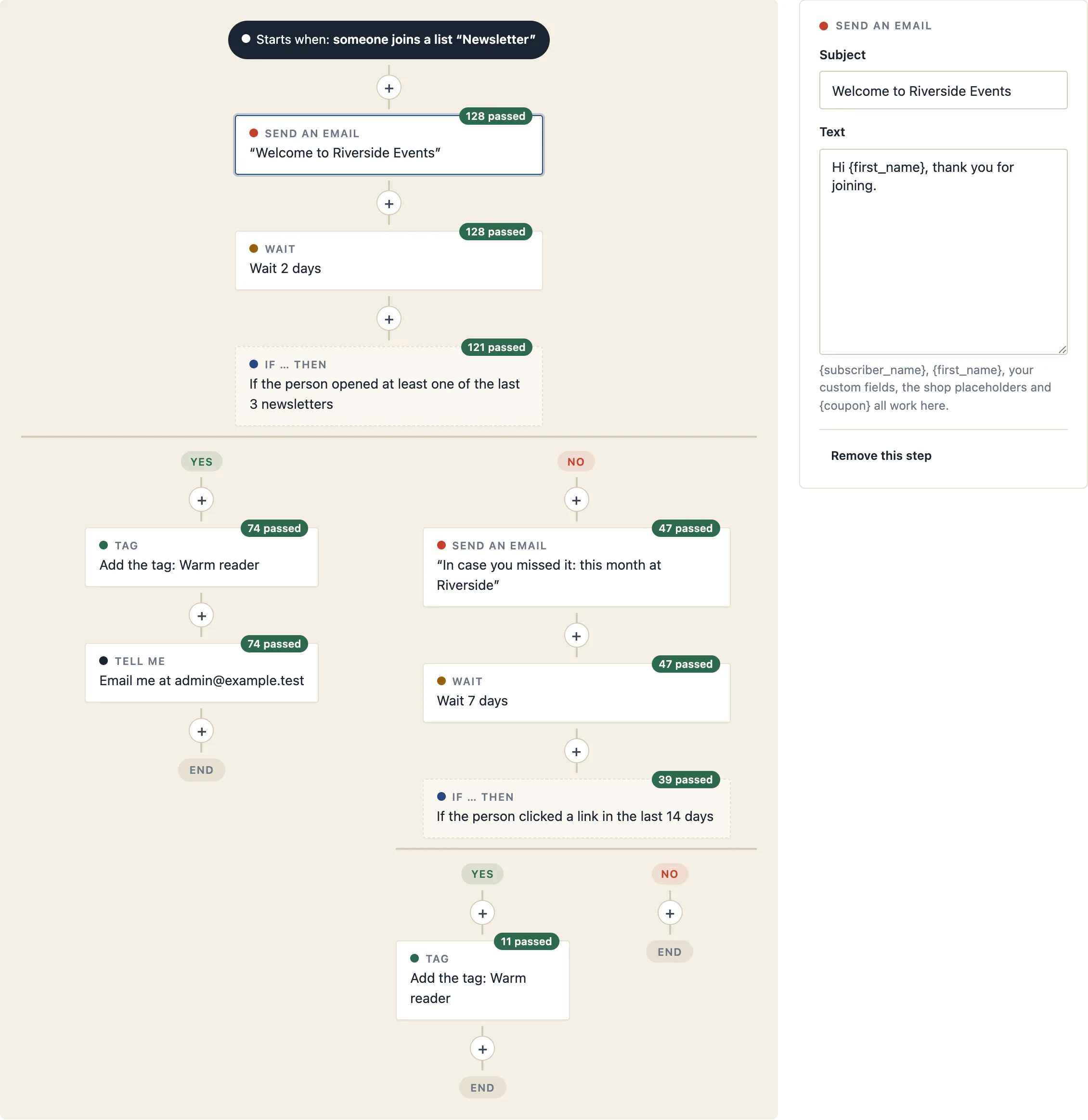
- Go to Postalion → Automations and press New automation. A new one starts with a sample path you can change: an email, a wait of two days, and an "if" with a step on each side.
- Give it a name and choose when it starts (see Triggers).
- Press + anywhere on the path to add a step there. Click a step to edit it in the panel on the right.
- Tick Active and save. Only people who arrive after that start; nobody is added from the past.
The steps
- Send an email: a subject and a text, written like a sequence email. The placeholders work: {first_name}, {subscriber_name}, your custom fields, the shop ones such as {order_number} and {product_names}, and {coupon} for a one-time code. The email uses the template chosen for the automation.
- Wait: minutes, hours or days before the next step.
- If … then: a question about the person, checked when they reach the step. Yes goes left, No goes right, and each side carries on with its own steps.
- Tag: add or remove a tag. Adding a tag can start another automation or sequence, or stop one.
- List: add to a list or take off one.
- Tell me: a short email to you (or another address) naming the subscriber, for a personal follow-up.
- Call a webhook: a JSON POST with the subscriber's details to Zapier, Make, n8n or your own code. See Webhooks for the format.
What an "if" can ask
- opened at least one, or none, of the last N newsletters;
- clicked a link, or nothing, in the last N days;
- joined in the last N days;
- placed a WooCommerce order in the last N days, or is a customer with no order in that time;
- has or does not have a tag; is on a list;
- is in one of your segments;
- has a value in a custom field.
Put a wait before an "if" about opens or clicks, so people have time to read.
Triggers
The same as for sequences: someone joins a list, someone gets a tag, any WooCommerce order, an order with a given product, an order from a category (its sub-categories count), a review request a number of days after an order, a cart left behind, or a customer whose last order is a number of days old. The shop triggers are explained in Shop automations.
Stopping early
An automation can stop for a person when they place an order or when they get a tag you choose. Unsubscribing always stops it. A person goes through an automation once; order-based ones start again for a new order once the previous run has finished.
The numbers
Each step shows how many people passed it, so you can see where they leave and which side of an "if" is busier. The list of automations shows how many are inside now and how many reached the end.
Editing a running automation
You can change texts and waits at any time; people inside pick up the change at their next step. Deleting a step that someone is waiting on ends their run there. Pausing an automation keeps everyone where they are until you activate it again.
Your list. Your server. Your letters.
Install it, send yourself a test, and see whether it suits you.